Skip to content

Lonestar Lake Park Suffolk VA

Featured Replies

Going to visit the park from Richmond area. 


Fishing from the bank 1st time at park.


Any spots or lures you recommend ?

  • Super User

Well, looks like we don't fish Lonestar State Park.


I don't fish it so I am no help.


Give us your feed back about this body of water and why did you select this place to go fishing?


And did you pick up your free copy of the 2018 Freshwater Fishing in Virginia booklet? You can get it at any Dick's and BPS in Ashland or Hampton or other tackle shop in Virginia.

  • 2 weeks later...

If you’re going to be in Richmond, you’d be better off fishing the James. It’s loaded with big smallies and catfish, and there is plenty of shore access, as well as wading opportunities. Suffolk is a very long drive and the access is very limited. 

  • 3 months later...
  • Author

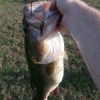
Lonestar - there are fish in there, bank access is not that awesome. It has alot of access for kayak or canoe and saw several. Multiple ponds, just not very walkable. Caught some dinks just casting from the cleared launch areas. I don't doubt there are some nice fish in there. Went there because we were exploring outside Richmond and I use to live in Windsor.  

Join the conversation

You can post now and register later. If you have an account, sign in now to post with your account.
Note: Your post will require moderator approval before it will be visible.

Guest
Unfortunately, your content contains terms that we do not allow. Please edit your content to remove the highlighted words below.
Reply to this topic...

Recently Browsing 0

  • No registered users viewing this page.

Important Information

We have placed cookies on your device to help make this website better. You can adjust your cookie settings, otherwise we'll assume you're okay to continue.

Account

Navigation

Search

Search

Configure browser push notifications

Chrome (Android)
  1. Tap the lock icon next to the address bar.
  2. Tap Permissions → Notifications.
  3. Adjust your preference.
Chrome (Desktop)
  1. Click the padlock icon in the address bar.
  2. Select Site settings.
  3. Find Notifications and adjust your preference.