swimb8t
New Member
-
Joined
-
Last visited
-
I had my Tracker Deep V for 3 yrs, after buying it off C'sList for $1,200 from a guy here on LI that only used it for salt water. Everything was preatty much original, inc. the 60hp Tracker, and it showed. After falling completely backwards off the stern post (came up with the decking and all), it was time. Myself and two other buddies over the course of about 10 weekends completely gutted it and restored it back to prestine condition. The only problem that we continued to have were leaky rivets, which really sucked. Sold it a couple of months ago for $4,700 (broke even but got three free yrs).....great boat and a lot of good times with the boys. Hoping that will continue with the Alumacraft.
-
Well said, and I appreciate your feedback. I am leaving on Thursday to head over to Pa with my new purchase. I will let you know my thoughts after I put a few hours on it, and I will probably have a couple of questions. Thanks again!
-
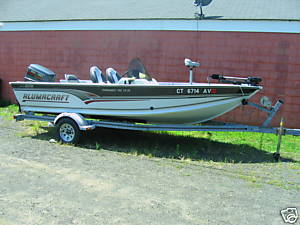
I just got rid of my 94 Tracker Pro Deep V 17 after doing a complete overhaul last winter. I am picking up my Alumacraft Tournament Pro 170CS tomorrow in Conn. What did you end up purchasing and what were your deciding factors??? Thanks....Dave
-
:)thank you gentlemen.....I appreciate the warm response.
-
swimb8t joined the community
-
and fell in love with the art of freshwater over the last three years. I grew up on a 32' Bertram out of Montauk and learned from the best, Pops!! Yes, fighting a Big Eye, tagging a Dusky, and weekend trips to Hudson Canyon are awesome, but I have a passion for this fw game....all I need is a fishing buddy willing to do some local or roadtrips here in the NE (I have an Alumacraft Tournament Pro 170CS) and perhaps point out to me that that is not a bunker pod in the middle of the lake. Look forward to hearing from you, thanks!