J_Mike8098
New Member
-
Joined
-
Last visited
-
-
BTW, Reaction Innovations said "there had been no other paint issues" with the new Vixen, so hopefully when my replacement arrives, the paint job will last because it's an incredible topwater lure. The action this thing has is great. Action-wise, it has all the great aspects of a Sammy and a Spook, all rolled into one.
-
Reaction Innovations got back to me quick as possible, and the problem was taken care of. Awesome customer service.
-
I sent Reactions Innovation an email, with a photo attached. I'll follow up with how this plays out. I'm actually a Reaction Innovations fan. They usually produce quality stuff, so maybe this lure came from a bad batch, especially for the high demand with the return of this old favorite.
-
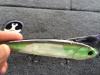
Here's a picture of the lure and how it looks after two days.
-
Well, my local tackle shop finally got a limited shipment of the new Reaction Innovations Vixen (only had 2 colors), so I grabbed one. The last of my old Vixens has been gone for a while, but after tying on the new Vixen, it was like old times. It sill catches fish. The smallmouth at Pickwick were schooling, and I had some nice fish blow up on my new Vixen. But here's the problem: After two trips to the lake, and only throwing topwater for the first few hours of the day, my brand new Vixen looks like it is six years old. On the first day, big chunks of paint started to chip off. Now, after two trips, all of the paint on both sides of the lure is completely gone, leaving just a stripe down the back of the lure, and the pearl paint on the belly. So far, it's still catching fish, but the paint on a $15 lure should last longer than two days with limited use. Anyone else having this issue?