GElliott
New Member
-
Joined
-
Last visited
Everything posted by GElliott
-
Look forward to seeing the pic DogBone
-
Hello everyone my name is Gary I live in Rochester Hills, Mi. I just started kayak fishing so, big time newbie! A lot to learn and a lot of questions to be asked. I am also looking for someone or a group who kayak fishes in my area that I can hook with to do some local fishing with. Thanks!
-
All great and helpful ideas, Thank you! I am going to listen to each of you and I think buzzed bait is right as I have found out so far, just to let it evolve and I will just wait till spring to do any permanent mounting on it.
-
DarrenM thanks! They do give you a trolley but it is probably only 5 to 6 ft long. I may go to BassPro and buy their trolley but use the anchor feelfree sold me which is nice. Flyfisher thanks as well to you for your reply and great idea, I will!! Thanks to all for the warm welcome and glad I can find help and ideas here.
-
Thanks kikstand454 I would like to know if you can send me a pic of how you have yours. Not trying to be a pita (pain-in-the-ass) just more of a visual guy!! Or send me a pic (be nice) to outdoornewsandreviews@gmail.com
-
I am well aware of the videos but, when I am looking for a Lure it has nothing. I can't find anything pics showing the set up. As far as placement and that. I have the idea and knowledge I just want to place it correctly. If you get time and kind find one specific to Lure 10 that would be great. I know the two mounts the pulley string goes in them but a pic would help me out a lot. Thanks for your reply buzzed bait.
-
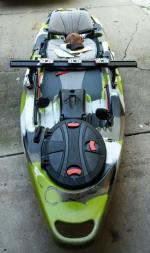
I am looking to install my anchor and anchor trolley I got from feelfree on my new Lure 10. I want to do it right but have found nothing related to the lure mounting their trolley system on their kayaks. Hoping someone could show me a pic or pics on how/where it should go.