


BiGFooT_Fishing86
New Member
-
Joined
-
Last visited
-
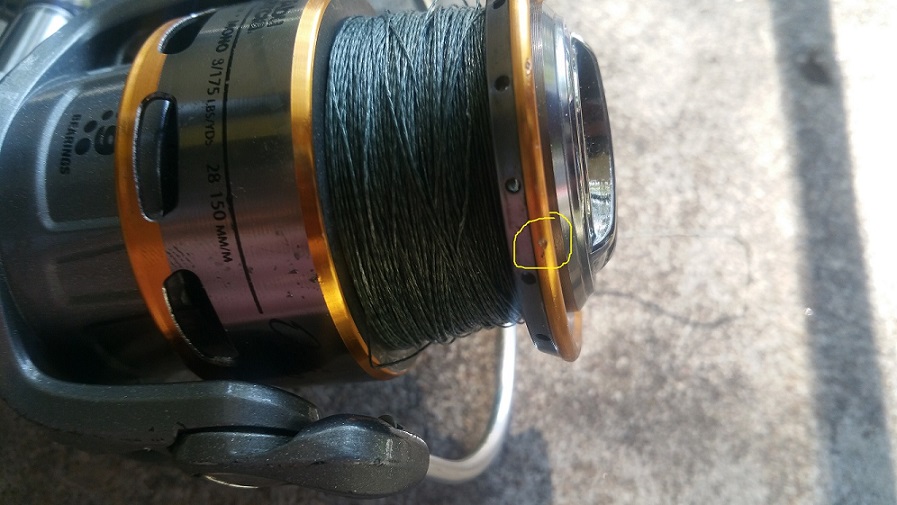
In the pic it does look like a dent. What would be the "bottom" part of the "dent" actually sticks out. Also, this is happening on the cast, not the retrieve. The other dent is actually a dent and I can't feel it at all when I rub my finger over that one. It's on the upper part of the lip where the line never touches. I've checked over the entire rest of the spool edge and the rest of that whole upper area and trust me the circled nick is the only possibility. These are the only two blemishes.
-
Most of mine have a few too and have never had a problem. This one must just be cut perfectly. It's an Abu Orra sx30. I looked it up and a new spool is about $20. I think I'll try to fix it first since it's an otherwise perfectly fine reel. If that doesn't work then I'll buy a new one.
-
BiGFooT_Fishing86 changed their profile photo
-
Thank you guys for the help and also the quick response.
-
I do have a dremel but thank you for the belt idea. Learned two things today, how bout that.
-
That sounds like a good option. Thank you, J.
-
Thank you, Darren. The nick is so small I almost missed it but have checked over the rest of the rig and that's the only hiccup in the whole thing. I even tried it on a different rod just in case there was something I missed. The line clearly breaks very close to the reel, definitely before the first eye. I'd also thought of the sandpaper but don't want to mar any more of the spool if I can help it.
-
I have a small nick in the upper part of my spool that has now cut the line a handful of times. Most recently cut 20lb. braid literally like it was nothing. I just saw my lure go flying with no jerk or anything. What do you recommend to smooth out this little nick.

