
Robert Batista
New Member
-
Joined
-
Last visited
-
-
-
-
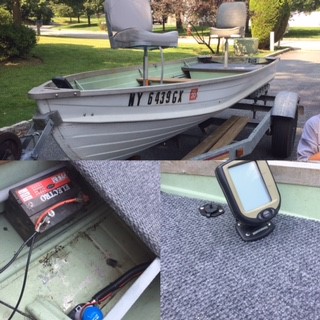
Hi, Just picked up my first boat yesterday. It's a 14 foot aluminum 1966 Starcraft. I'll be using it to fish with my 12 and 7 year old in Harriman state park, NY. Boat came with a front and rear deck, two swivel fishing chairs, a fish finder, and bilge. The previous owner mounted the fish finder to the front deck (see pic)and ran the wires via PVC conduit pipe to a small battery in compartment under the rear deck (see pic). I told him I would likely put a small electric trolling motor on the boat. He recommended I mount it to the bow and utilize the 4 prong connection he installed next to the fish finder. My Questions: 1) Is there a reason I wouldn't mount the electric trolling motor to the back of the boat? This seems more intuitive to me...as a newbie. I would just put another battery (12V marine) in the compartment to power the trolling motor. 2) If I did utilize the 4 prong connection on the bow, would I need to fish another power line back through the conduit to a second battery? or would I just upgrade the battery he had there (in pic). Just starting out and have been really inspired by all the build potentials. At the moment, I'm just trying to get the fundamentals down. Thanks in advance for any replies