libertatem in perpetuum
New Member
-
Joined
-
Last visited
-
libertatem in perpetuum replied to libertatem in perpetuum's topic in Bass Boats, Canoes, Kayaks and moreThis is exactly what I was looking for. I’d have to cut out the larger metal tray, but I think that I could make that work. I’ll take some measurements to verify. Thanks for the help.
-
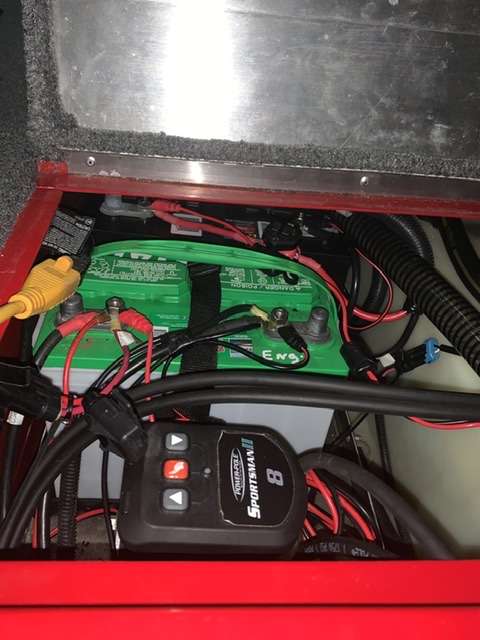
libertatem in perpetuum replied to libertatem in perpetuum's topic in Bass Boats, Canoes, Kayaks and moreThat’s the pump. What the pictures don’t show very well is the reservoir at the base of the pump. The reservoir is what takes up the most space and what you need access to check/ add hydraulic fluid.
-
libertatem in perpetuum replied to libertatem in perpetuum's topic in Bass Boats, Canoes, Kayaks and moreThanks for the replies. Gimruis, you are correct that I can’t fit 2x group 27s side by side. I measured again this morning. I’m considering mounting the power pole pump to the outboard side of the inner, port-side, transom support. I would just have to move my onboard charger, but I’ll already have to relocate that for a three bank anyway. If I didn’t already have the power pole, I would consider a talon for the same reasons you listed. Hopefully someone will come along that has my same setup.
-
Hi everyone, new to the forum here. I purchased a 2017 tracker 175 txw earlier this year. Love the boat so far. Only had 25 hours on the motor, came with good electronics, and a power pole. Has been almost perfect for how and where I fish, except that I want to upgrade to a 24v TM. It currently still has the factory Minn Kota Edge 45 on it. I want to go ahead and organize the battery compartment on my boat to hold a third battery so at least I can swap to a fresh battery when my 12v system has smoked one during the day. The power pole pump currently sits where a third battery would normally go. I’ve been trying to figure out the best way to rig a third battery w/ the power pole pump without sacrificing a storage compartment. I know that the pump has to be moved, just can’t figure out the best place for it to go. Has anyone else ran three batteries and a power pole in a tracker 175? If so, how was it rigged? Any assistance would be greatly appreciated. Pics of current rigging attached. I will be cleaning up the wiring as part of this project.