


Steve Erickson
New Member
-
Joined
-
Last visited
Everything posted by Steve Erickson
-
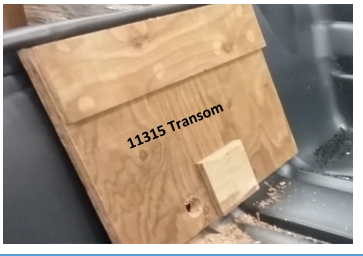
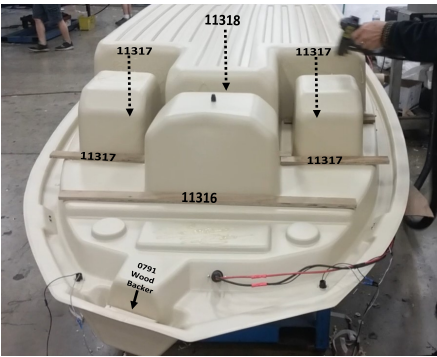
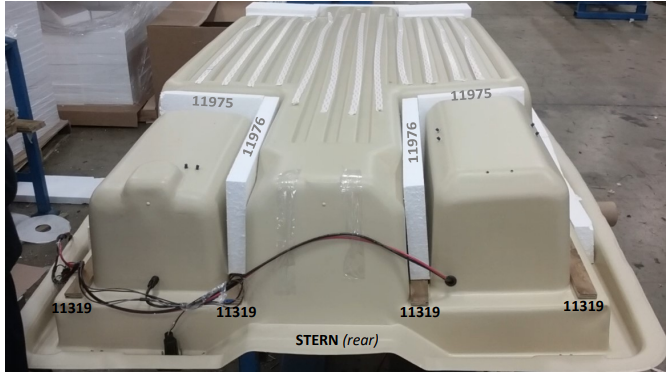
As you can see, It has been been determined I'm not a terrorist, and have been accepted into your flock, thank you. I have a couple more pictures of the assembly, but they apparently exceeded my allowable limit of digibites, so was unable to post them (nothing too exciting, just showing the sub-floor/transom support platform). As you can see, there is a little wood in the boat, but not much that can really be considered structural. But, it does let you know where screws may hold, hopefully.
-
A number of the requests and questions I see posed on this thread can be answered and dealt with by contacting KL Industries in Muskegon, Michigan. Though they no longer manufacture the Pro 120, they do have many parts and good customer service still available. I bought new complete carpeted decks with hatches from them a year ago or so... reasonably, I thought, compared to what it would take time and money-wise to do as nice a job (though I had no shipping costs, picked them up). Their customer service is very helpful... when I asked about the wood structure, I was emailed some pictures of the actual boat being manufactured, showing the structural framework (I'd gladly post a picture, but as this site has deemed me a security risk and not allowed membership, I won't at this time... a robot thinking I'm a robot apparently). Most of the "bolt-on" parts on the boat are/were outsourced by them from major manufacturers, such as Atwood, Sea Sense, etc.. My project before summer this year is to rig up remote control for a rear mount trolling motor, using some kayak remote ideas (Pelican cable steering assembly, lever located by the rear seat... possibly utilizing the complete trolling motor head, or, plan B, a remote power control next to it). I've always found the stock rear seat position awkward and uncomfortable accessing the tiller. If I can get membership at this site, I'll share some pix with you as I progress...

Important Information
We have placed cookies on your device to help make this website better. You can adjust your cookie settings, otherwise we'll assume you're okay to continue.