Skip to content

Glitter Baits

Featured Replies

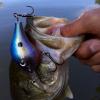
The Pic Doesn't Show The Depth Of The Glitter , The Type Of Glitter Used Is Shot Through A Airbrush , When Light Hits The Bait All The Colors Jump and Shift.  Not Sure If I'll Spray Any Transparent Paint Over Parts Of The Bait.


Mike

post-38473-0-68826100-1426650890_thumb.j

Looks pretty cool. Show us some pics of fish caught on it when you try them out.

  • Super User

That's one of those even if it doesn't catch a fish it still looks sweet! I'm sure it'll catch something though. Similar to the look of the old tinsel tail spinnerbaits that were pretty darn deadly. 

That looks awesome.  What kind of paint is it? I've been looking for something like that. 

  • Author

Thanks All , 


Hey Big C , Here's The Info: House of Kolor , Ultra Rainbo Mini Flake - Shimrin (1st gen) Dry Ultra Mini Flake, 4 oz. (Ready-to-Spray) Item #: HOK UMF03/SG100-4Z

  • 4 oz. Bottle - READY TO SPRAY (UMF) Ultra Mini Flake
  • Mixed with SG100 & Reduced 2:1 with RU311 Medium Reducer to be Airbrush or Spray Gun Ready
  • Flakes can be added to any of the HOK SG Karriers and Klears

post-38473-0-77842900-1426695422_thumb.j

Sweet thanks for the info.  Keep up the good work.

Join the conversation

You can post now and register later. If you have an account, sign in now to post with your account.
Note: Your post will require moderator approval before it will be visible.

Guest
Unfortunately, your content contains terms that we do not allow. Please edit your content to remove the highlighted words below.
Reply to this topic...

Recently Browsing 0

  • No registered users viewing this page.

Important Information

We have placed cookies on your device to help make this website better. You can adjust your cookie settings, otherwise we'll assume you're okay to continue.

Account

Navigation

Search

Search

Configure browser push notifications

Chrome (Android)
  1. Tap the lock icon next to the address bar.
  2. Tap Permissions → Notifications.
  3. Adjust your preference.
Chrome (Desktop)
  1. Click the padlock icon in the address bar.
  2. Select Site settings.
  3. Find Notifications and adjust your preference.