Skip to content

Playing with colors

Featured Replies

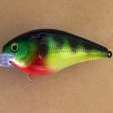
I was messing around with different colors today and kind of like this pattern. Should I add anything else to it?

C0CE5C60-ACB7-483D-8FBB-9EC32511E773.jpeg

Looks beautiful! How about a silver belly?

An eyeball but other than that I like it

  • Author

Ok there is the eyeball! Lol!A8BBC630-3E09-495A-915E-DB1AFA035963.thumb.jpeg.9f79289d7adff1443481227b7f5b35f8.jpeg

3 hours ago, Duckaholic said:

Ok there is the eyeball! Lol!A8BBC630-3E09-495A-915E-DB1AFA035963.thumb.jpeg.9f79289d7adff1443481227b7f5b35f8.jpeg

I want one!!!!! ?

Yup simple pattern that is sure to catch fish.


I would add a black shad dot. Use a hole punch in a playing card or business card as a stencil.

13 hours ago, Duckaholic said:

Should I add anything else to it?

Nope ..... All good.

Sometimes less is more.

14 hours ago, Duckaholic said:

Ok there is the eyeball! Lol!A8BBC630-3E09-495A-915E-DB1AFA035963.thumb.jpeg.9f79289d7adff1443481227b7f5b35f8.jpeg

Looks awesome!

great work

Join the conversation

You can post now and register later. If you have an account, sign in now to post with your account.
Note: Your post will require moderator approval before it will be visible.

Guest
Unfortunately, your content contains terms that we do not allow. Please edit your content to remove the highlighted words below.
Reply to this topic...

Recently Browsing 0

  • No registered users viewing this page.

Important Information

We have placed cookies on your device to help make this website better. You can adjust your cookie settings, otherwise we'll assume you're okay to continue.

Account

Navigation

Search

Search

Configure browser push notifications

Chrome (Android)
  1. Tap the lock icon next to the address bar.
  2. Tap Permissions → Notifications.
  3. Adjust your preference.
Chrome (Desktop)
  1. Click the padlock icon in the address bar.
  2. Select Site settings.
  3. Find Notifications and adjust your preference.