Skip to content

What adhesive should I use for this part?

Featured Replies

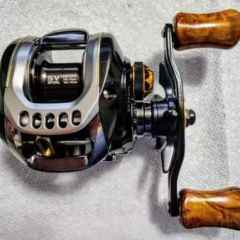
Just finished cleaning and assembling a Daiwa T3 SV, except this little part shown in the picture. It's a small metal piece that sits on top of the plastic front guard. I guess the sole purpose is to avoid lines rubbing on the plastic front guard. This original glue between them has been cleaned. I could superclue it back to the front guard, but I also want to be able to remove it for deep cleaning next time.  What non permanent adhesive should I use so it won't fall off but remains removable? Thanks!


49YNfqS.jpeg

If it was glued on, I don't think it was meant to be removed.  I would just glue it back on.  I use gel super glue.

If you want it to be removable, use a micro amount of clear silicone caulk. After it cures, you can pry or cut through it with single edge razor blade. Its totally waterproof.

  • Super User

Seems like it should be permanently

in place. For that a tiny spec of super glue for me. If you want it removable, loctite green. Kinda a baby superglue. 

You could use tip top adhesive. It holds pretty good, and light heat softens it up. 

Personally, I would sand contact areas and use something permanent (epoxy), but that's just me.

  • Author

Thanks for the advices! If I superglue it, the whole front guard piece would unremovable from the frame, which could make deep cleaning a bit tricky. The caulk sounds like a good idea. I think I still have some left. If not, I'd just try the other options. Thanks guys!

  • Author
52 minutes ago, Bigbox99 said:

It's there to stop line from eating into the plastic.  


https://www.tackletour.com/reviewdaiwat3ballisticpg3.html


Yep, I think so as well, given the front guard and the whole frame are plastic/carbon. Actually there's another metal piece under that "hood," for the same purpose I believe. It's probably also glued on.

Join the conversation

You can post now and register later. If you have an account, sign in now to post with your account.
Note: Your post will require moderator approval before it will be visible.

Guest
Unfortunately, your content contains terms that we do not allow. Please edit your content to remove the highlighted words below.
Reply to this topic...

Recently Browsing 0

  • No registered users viewing this page.

Important Information

We have placed cookies on your device to help make this website better. You can adjust your cookie settings, otherwise we'll assume you're okay to continue.

Account

Navigation

Search

Search

Configure browser push notifications

Chrome (Android)
  1. Tap the lock icon next to the address bar.
  2. Tap Permissions → Notifications.
  3. Adjust your preference.
Chrome (Desktop)
  1. Click the padlock icon in the address bar.
  2. Select Site settings.
  3. Find Notifications and adjust your preference.