Skip to content

SoCal Spotted Bay Bass on a Drop Shot

Featured Replies

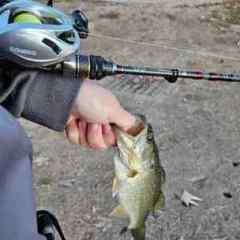
I learned that bay bass are biting well during gloomy days in SoCal so I took the opportunity to go with basic finesse drop shot with Yamamoto Scope Shad 3 inch. Couldn't figure out how to stroll with it, but it sure works on drop shot.

20250505_192459.jpg

  • Super User

Good deal.  I primarily use the small Scope Shad as a Ned bait.  My go to on the dropshot is the Shad Shape Worm, Pro Senko, or Kut Tail.  Glad to see it worked for you.  

  • Author

I like the fact scope shad makes it possible to work "fast". I know it sounds ridiculous on a drop shot but I am working on it horizontally 99% of the time so having pintail style bait works as a bottom hopping when texas rig won't work (or gets drifted too often by the wave). I need to play around more with paddletail style like Berkley Maxscent one and probably your suggestion to get to know more.

  • Super User

It’s not unusual for me to have three dropshot rigs on my deck.  One setup for vertical presentations, one for casting and one for dragging or drift fishing.  All with different baits, weights, and tag lengths.  Some will double with other presentations, like my vertical setup on bed fishing. Dropshotting was one of the first finesse techniques I picked up 30 some odd years ago and it has been very successful. 😉

Join the conversation

You can post now and register later. If you have an account, sign in now to post with your account.
Note: Your post will require moderator approval before it will be visible.

Guest
Unfortunately, your content contains terms that we do not allow. Please edit your content to remove the highlighted words below.
Reply to this topic...

Recently Browsing 0

  • No registered users viewing this page.

Important Information

We have placed cookies on your device to help make this website better. You can adjust your cookie settings, otherwise we'll assume you're okay to continue.

Account

Navigation

Search

Search

Configure browser push notifications

Chrome (Android)
  1. Tap the lock icon next to the address bar.
  2. Tap Permissions → Notifications.
  3. Adjust your preference.
Chrome (Desktop)
  1. Click the padlock icon in the address bar.
  2. Select Site settings.
  3. Find Notifications and adjust your preference.