Skip to content

Hackney On Toledo Bend With Mr. Crappie

Featured Replies

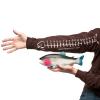
I don't know who's seen this. This is pretty crazy. Greg Hackney is fishing on Toledo Bend with Mr. Crappie. Just start the video at 25 minutes. I believe this was filmed last fall and Hack was still on a roll. When you're hot you hot. 


I watched this the other day. That bass came up and ate his crappie whole. I don't think it was a ten pounder like some of the video titles have stated, but a toad nonetheless.

  • Author

All the episodes are great.

You should change the title to 10lb bass caught on live crappie and get your popcorn ready. For anyone who hasn't seen this, go to the 25:00 minute mark and enjoy!

  • Author

You should change the title to 10lb bass caught on live crappie and get your popcorn ready. For anyone who hasn't seen this, go to the 25:00 minute mark and enjoy!

Haha hackney's secret bait

  • Super User

I saw photo's of this back whenever it happened. Pretty cool to see it happen on video. 

Wow that's crazy. Glad you shared this. I haven't seen this.

  • Super User

That's awesome!

pretty cool, I had to share on my facebook lol

  • Global Moderator

Hack just seems like a cool dude! He's really intense and focused while he's fishing, but still almost always seems like he's having a good time.

  • Author

Hack just seems like a cool dude! He's really intense and focused while he's fishing, but still almost always seems like he's having a good time.

Blue, YOU'RE MY BOY!!!

That's crazy! Thanks for posting that.

  • Super User

"See that's what I come down here for.." (Not Crappie)

"Get him in the net..."  As Mr. Crappie does his best to land a BIG fish


and my favorite Hack Attack part was


"That's what I come down here for, no stinking crappie man.."


Cool dude!

Join the conversation

You can post now and register later. If you have an account, sign in now to post with your account.
Note: Your post will require moderator approval before it will be visible.

Guest
Unfortunately, your content contains terms that we do not allow. Please edit your content to remove the highlighted words below.
Reply to this topic...

Recently Browsing 0

  • No registered users viewing this page.

Important Information

We have placed cookies on your device to help make this website better. You can adjust your cookie settings, otherwise we'll assume you're okay to continue.

Account

Navigation

Search

Search

Configure browser push notifications

Chrome (Android)
  1. Tap the lock icon next to the address bar.
  2. Tap Permissions → Notifications.
  3. Adjust your preference.
Chrome (Desktop)
  1. Click the padlock icon in the address bar.
  2. Select Site settings.
  3. Find Notifications and adjust your preference.