Skip to content

What makes a Smithwick PRO Rogue a PRO?

Featured Replies

Came across several produced in 2012 or 2014 with this designation.  


I searched the site and found a range of opinions and speculation on what made the "pro" version distinct, including special colors, special hooks, and tungsten balls. 


There was no consensus that I could find.


Any known problems with these, or other reason why they would be on clearance at DSG with no sign of "Pro" versions being sold on Lurenet?   


  • Global Moderator

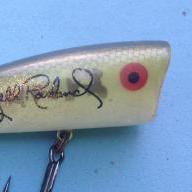
I believe they were offered in special colors that were favorites of pros sponsored by the company at the time, at least if it's the version I'm thinking of. I had some in Avacado shad that had a pros signature on them, caught a ton of fish on them.

  • Super User

Like Bluebasser86 mentioned they were colors a couple Pros liked nothing more.

  • Super User

Special colors as Bluebasser86 pointed out. I love Rogues, they get overlooked in favor of more expensive options when it comes to jerkbaits but I've caught more fish on them than any other. The one thing I hate about the Rogues are all the different models, you have the pro models, suspending, original floating as well as a smaller Jr. size along with a shallow, medium, and deep diver. Then to add to the confusion you have "pro" models which are different colors, then you have the Limited which is bigger with Gamakatsu hooks, then the Elite 8 and perfect 10 not to mention the top 20, yeah, they are a pain to keep track of, especially the way they package them, but well worth the effort.

Join the conversation

You can post now and register later. If you have an account, sign in now to post with your account.
Note: Your post will require moderator approval before it will be visible.

Guest
Unfortunately, your content contains terms that we do not allow. Please edit your content to remove the highlighted words below.
Reply to this topic...

Recently Browsing 0

  • No registered users viewing this page.

Account

Navigation

Search

Search

Configure browser push notifications

Chrome (Android)
  1. Tap the lock icon next to the address bar.
  2. Tap Permissions → Notifications.
  3. Adjust your preference.
Chrome (Desktop)
  1. Click the padlock icon in the address bar.
  2. Select Site settings.
  3. Find Notifications and adjust your preference.