Skip to content

If your reel's sideplate is not metal

Featured Replies

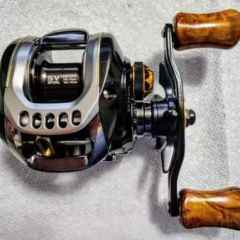
NOT too hard when tighten the sideplate screws. Even after I kept telling meself "not too hard, not too hard...," still this happened. It still holds for now, but not sure for how long. 


IMG20230426130347.jpg

  • Super User

I'd get some super glue into the crack and then back out the screw to let the crack reseal itself.  It should stop the crack from getting bigger, but yeah, you're on borrowed time.  I'd say just order a new side plate now so when it breaks you can fix it.

Get a side plate and spool knob from the original tatula.  Those were aluminum and fit the tatula ct frame.  The tatula ct is just a plastic side plate narrow frame version of the old tatula.  I think the colors even match if it's the old ct and not the 2020.  

pictdaiwatatula30.jpg

There are definitely different grades of composite side plate material. The better reels will have a 60/40 ratio of nylon/carbon and can take some serious torque.  

  • Author
4 hours ago, Tatulatard said:

Get a side plate and spool knob from the original tatula.  Those were aluminum and fit the tatula ct frame.  The tatula ct is just a plastic side plate narrow frame version of the old tatula.  I think the colors even match if it's the old ct and not the 2020.  

pictdaiwatatula30.jpg


Hmm, didn't know that. Will give it a try, thanks!


5 hours ago, casts_by_fly said:

I'd get some super glue into the crack and then back out the screw to let the crack reseal itself. 


Yes that's what I did, but not sure how well it'll hold though.

You should never overnighten those screws - just put some blue loctite on and snug them up

Join the conversation

You can post now and register later. If you have an account, sign in now to post with your account.
Note: Your post will require moderator approval before it will be visible.

Guest
Unfortunately, your content contains terms that we do not allow. Please edit your content to remove the highlighted words below.
Reply to this topic...

Recently Browsing 0

  • No registered users viewing this page.

Important Information

We have placed cookies on your device to help make this website better. You can adjust your cookie settings, otherwise we'll assume you're okay to continue.

Account

Navigation

Search

Search

Configure browser push notifications

Chrome (Android)
  1. Tap the lock icon next to the address bar.
  2. Tap Permissions → Notifications.
  3. Adjust your preference.
Chrome (Desktop)
  1. Click the padlock icon in the address bar.
  2. Select Site settings.
  3. Find Notifications and adjust your preference.