
Glenn
BassResource.com Administrator
-
Joined
-
Last visited
Everything posted by Glenn
-
All of these bugs have been resolved. However, if you PM'd me to get your stored e-mails sent to you, please do so again.
-
This bug has been resolved. The "Away" message option has been restored.
-
I'm getting this question several times a day, so I'll answer it here: Due to the increased security of the forums, your username and display name cannot be the same. If you were a member prior to the redesign, you were grandfathered in, meaning you do not have to change your display name UNLESS you change your profile or use the "forgot password" feature. Please read the Help section for instructions on how to change your "Name" in your profile if you are asked to do so. Also, please do not e-mail or PM me about this, as I will just point you to this thread. Thank you for your compliance and understanding. Glenn
-
Very well said, Russ! The only thing I can add is a heartfelt Thank You to all our senior members for welcoming in the new members and making them feel at home. Y'all are AWESOME!
-
Refresh your browser.
-
This isn't a fake. I remember seeing the raw footage as it came over the satellite back in my TV news days. This happened in south America somewhere (can't remember where). They guy was drunk and decided it would be fun to climb on top of a 1000' tower. Good thing you guys only saw it from a thumbnail version on the web. In a full TV screen, in slow motion, the guy gets cut in half as he lands on the cement wall surrounding the tower. There's a lot of stuff like that you never see on TV. But I saw more than my fair share of stuff like this, including murders, vicious car wrecks, natural disasters, and horrible accidents (like the one where power lines fell into a crowd, killing 100+ people and then "cooking" them, setting the bodies on fire). It's gory stuff. At first you're fascinated, but then it just makes you sick after you've seen a few. They still stick in my memory, which is why I remember the video here. In fact, I recognized it before it even played.
-
Essentially the Buddy List is a custom members list... for each user. When you have members you placed on your Buddy List, they will be listed on your User CP (aka My Center) when you first click on the User CP. On that displayed Buddy List you'll have quick access to those users... such as links to their email, PM, profiles, website; and whether or not they are online. So you don't have to use the forum's main member list or scour the forum... for someone you communicate with frequently. Hope that helps.
-
I'mmm oonnnn iittt!!! *runs out the door* .... hey, wait a minute!
-
It's not the transfer that causes the problem, it's the camera. Make sure you get one with at least a 1.5 megapixel camera. Most have 2 megapixels these days, which is fairly good, and way better than the camera phones of even a year ago.
-
-
If you PM'd me earlier about getting your IM file, please do so again as I accidentally deleted my PMs. To the guys having the scrolling issue - are any of you using IE?
-
It works like the Out Of Office message in Outlook. You can read more about it in the help section (click the link above). But really, no need to worry about it for now. It's been disabled, so there's no risk of losing PM messages now.
-
I have disabled this feature temporarily. There is a very nasty bug with this feature that effectively deletes ALL the PMs of the recipient of an "Away" message! Fortunately, very, very few members used it, so the risk is minimal. That said, I was the poor sap that it happened to, so I was the sacrificial lamb for y'all. Further investigation reveals it's a bug in the forum, so I've disabled that feature until I fix it.
-
Brent has boobs. Ba-HA! ;D
-
All, If you have been experiencing any of these recently, the problem should be cleared up now. If you couldn't login before, or were seeing errors, you should be able to login now. The errors should be gone as well. Please note - I had to delete everyone's stored messages. However, I kept a backup copy of them. Please PM me if you want them. But understand they're in a single text file, meaning no formatting. So they're a little hard to read, but at least the information is there if you wanted phone numbers, addresses, etc. Also note, if your PM box requires excessive scrolling and/or looks like the screenshot below, please let me know. It shouldn't look that way (note the long column of text). That's a bug that I can fix.

-
Look to the left and click "board" instead.
-
Ya, like we haven't seen that one before. Seems everyone thinks this is unique and funny. Youtube is LOADED with the "scary face pops up with loud shriek" videos. B-o-r-i-n-g
-
Again.. known issue. Folks - I know there are PM issues and I'm working on resolving them. Please refrain from posting every PM error you see. Trust me, I've seen them and I'm working on them. No ETA when they'll be fixed, so just sit tight and be patient. Thanks! Glenn
-
I removed the "all" links because, it turns out, that was a major cuplprit for the slowness.
-
This might just be a Firefox issue...but mine seems to be flush left, as you can see in the picture. Running Safari...same problem here. Refresh your browser (CTRL+R). I've made a partial fix for "other" browsers. [begin rant] This is why I hate Firefox. If you're a developer... you hate it. It's extremely unforgiving, causing to you to re-code entire sections of a site (like now) for one cosmetic issue for a minority of visitors. At least IE is smart enough to understand variances in coding styles. [/end rant]
-
Known issue. I'm working on it. No ETA on a fix yet.
-
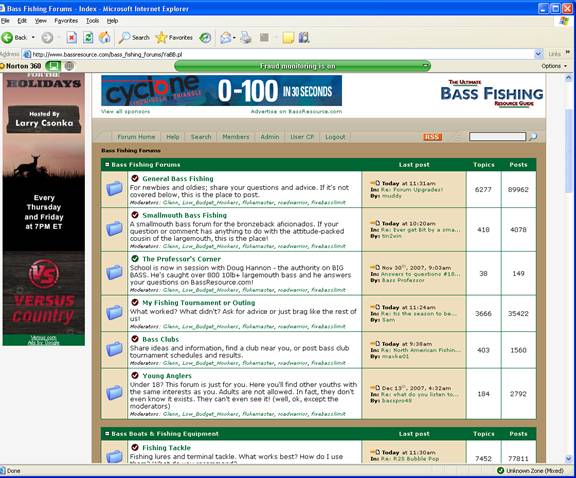
I think you're seeing what you're supposed to see. The forums WILL NOT CENTER on your page any longer. They are flush right by design. See screenshot below. You should not need to scroll left-right, however.
-
Firefox/Opera users, I'm aware of the issue. But please keep in mind that less than 17% of visitors here do not use IE, so the issue will be prioritized accordingly. Again, the scrolling issue is resolved by clearing your cache and restarting your browser. I do not have the time to provide computer support here. Look up "clearing cache" on Google to learn how to do it. Again, key is to close your browser and restart after clearing cache. NJBassDevil3254 - looks like you may have a Norton firewall setting that blocks ads. Nothing I can do about that here.
-
To all experiencing the "horizontal scroll" issue that have changed your screen settings and are still seeing the problem. Please clear your cache, close all browser windows, and then restart your browser.
-
Thanks guys. For the "centering" issue. The new layout uses more width, which means for a few folks you'll need to adjust one of two things (or possibly both). 1. Way, waaaay up in the upper right corner of your browser, click the button right next to the red X (should be the middle button - looks like a square). 2. If that doesn't fix it, then right-click anywhere on a clear area on your desktop (not an icon) and select "properties" from the menu. Now click the "settings" tab. Now change the screen resolution to something OTHER than 800x600 (I recommend 1280x1024) and click "ok", then follow the instructions in the prompts. Things will seem really small to you at first, but try it out for awhile. Once you get used to it, you won't want to go back! Please note I'm working on a few glitches that affect only people who stored past personal messages, myself included. Also, please click the Help link above to learn how to use the new features. Reelmech - you're absolutely wrong. Dialup and 800x600 screen resolutions are things of the past. You're in a very small minority (about 5%).