Skip to content

Loch-ness Or Alligator Gar?

Featured Replies

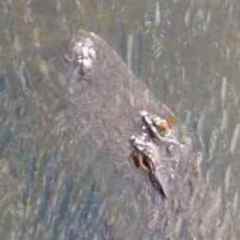
Was out fishing a pond on the golf course a couple of days ago and took a video of what I think was a Alligator Gar. It was at least 4 ft in length... maybe more. I couldn't get the video to upload, so here is a still. It appeared to be feeding on small fish. Can anyone tell from the photo if it is in fact a Gar of some kind? I have not seen Gar in this pond before.

VID_20210330_094126217_exported_70144_1617165011817~2.jpg

100% baby Loch Ness Monster.  Momma Loch Ness spawns in ponds and lakes, and leaves her babies in the ponds to fend for themselves, once they get big enough.  She must have left or you'd have been dead meat, she is very protective of her babies before she leaves.  You're lucky your still alive!

  • Global Moderator

Grass carp will reach 4' pretty often in golf course ponds. They put them in to control the weed populations to keep them more aesthetically pleasing. 


Your picture captures a clear sign it's not a gator gar. Gator gar have big, round tails with no fork in them, something that fish clearly has. Grass carp have big, forked tails. 

Grass Carp eating:  Grass Carp. Feeding – DFW Urban WildlifeApparently they eat 20%-100% of there body weigh in plants every day as long as the water is 50*+.  They won't eat green algae(snot grass) because they can't break it off to "chew" it. 

1 hour ago, HaydenS said:

They won't eat green algae(snot grass) because they can't break it off to "chew" it. 


I don't blame them. Who wants to eat snot?

It’s either the Loch Ness or Bigfoot searching for carp.

Join the conversation

You can post now and register later. If you have an account, sign in now to post with your account.
Note: Your post will require moderator approval before it will be visible.

Guest
Unfortunately, your content contains terms that we do not allow. Please edit your content to remove the highlighted words below.
Reply to this topic...

Recently Browsing 0

  • No registered users viewing this page.

Important Information

We have placed cookies on your device to help make this website better. You can adjust your cookie settings, otherwise we'll assume you're okay to continue.

Account

Navigation

Search

Search

Configure browser push notifications

Chrome (Android)
  1. Tap the lock icon next to the address bar.
  2. Tap Permissions → Notifications.
  3. Adjust your preference.
Chrome (Desktop)
  1. Click the padlock icon in the address bar.
  2. Select Site settings.
  3. Find Notifications and adjust your preference.