Todd Driscoll
Members
-
Joined
-
Last visited
Everything posted by Todd Driscoll
-
Assuming you also have an outboard engine, I would mount the ducer to your transom. That way, you can view downscan while you are fishing and while you are running the outboard.
-
Yes, for the stand-alone Mark/Elite DSI units, if running the unit at the bow, mount the ducer on the trolling motor. But, a trolling motor bracket does not come with the unit. You can order one at LEI Extras, part # 10261-001 http://www.lei-extras.com/store/search.asp?SearchType=Unit&Unit=Elite%2D5+DSI
-
Try two landmarks for triangulation Certainly true, but I suggest that for $200-300 more, either a sonar or DSI unit with GPS is absolutely worth every penny.
-
First, a sonar only unit will not show GPS info when linked to a GPS unit. Just FYI, the reverse is true - a mapping only unit will show sonar from an Ethernet-linked sonar unit. Your 510 is NMEA 2000 network compatible, but really the only advantage you get when networking this sonar-only unit is sharing of a network temp sensor. But, the Elite-5 DSI is not NMEA 2000 compatible, just NMEA 0183. Even so, because GPS is not shared to a sonar-only unit, there would really be no functional need to network them.
-
The Lowrance Mark and Elite DSI reference manuals are now on the web. The direct link for the Elite DSI is below. http://www.lowrance.com/Products/Marine/Mark-Elite-Series/Elite-5-DSI/Downloads/
-
Similar to what Wayne said, the reason Lowrance no longer works on certain older units is that they cannot get the parts from their suppliers. Technology moves so fast, that the folks supplying the parts move with it. If parts were available, units would be fixed.
-
I will be there working the Lowrance booth, come down and see us!
-
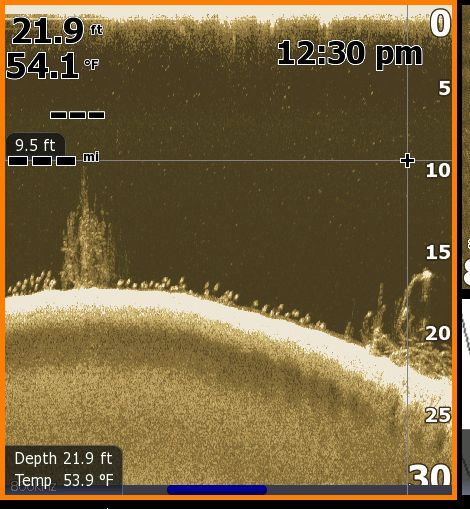
The screen scrolls from right to left, so the right side of the screen is most current info. However, with the cursor (you can see it on the pic), you can scroll back in time to look at recent history with the screen still. That is what I did to take this pic. Unit was an HDS-10, image from the LSS-1 StructureScan.
-
Yes, at Sam Rayburn Todd, you forgot the cordinates. Yeah, if you notice the picture is cropped, windows to the right had the coordinates,
-
Yes, at Sam Rayburn
-
To further show just how great the LSS is, I should have made a pass with 2D sonar side by side. These fish were close enough to the bottom that only an experienced sonar user would have known all these fish were there. Target separation close to bottom or cover is where this technology really shines.
-
There is no grass there. One brushpile is right under the "mi" abbreviation, the other at the right edge. Just a smooth bottom otherwise, with a ton of fish (all individual white dots).
-
I was idling over a brush covered ridge, and downscan revealed a large school of fish oriented to the bottom between two brushpiles. Turned around and caught fish literally every drop with a dropshot for an hour. Fish in the pic are 12 - 14 inch bass.
-
Great perspective on tourney fishing. Another good one is Diary of a Bass Pro (Joe Thomas). Other favorites are Knowing Bass and Sowbelly.
-
Agreed! NavPlanner 2 is great, I've had it for 6 months. Great for researching lakes you are relatively unfamiliar with and for cleaning up your user files.
-
I work as a fisheries mgmt biologist, and no doubt, bass are highly cannibalistic. Males protecting fry won't consume them, but the cannibalism starts when the fry/fingerlings disperse out on their own. Highest rates of cannibalism are late summer through to winter, when young bass reach more desirable forage sizes. But, its more just the opportunistic nature of bass, rather than specifically seeking its own for a meal. Due to cannibalism, and a suite of many other factors causing age 0 bass mortality, each nest typically produces thousands of fry to combat the overall mortality rate.
-
I work as a fisheries mgmt biologist, and no doubt, bass are highly cannibalistic. Males protecting fry won't consume them, but the cannibalism starts when the fry/fingerlings disperse out on their own. Highest rates of cannibalism are late summer through to winter, when young bass reach more desirable forage sizes. But, its more just the opportunistic nature of bass, rather than specifically seeking its own for a meal. Due to cannibalism, and a suite of many other factors causing age 0 bass mortality, each nest typically produces thousands of fry to combat the overall mortality rate.
-
I work as a fisheries mgmt biologist, and no doubt, bass are highly cannibalistic. Males protecting fry won't consume them, but the cannibalism starts when the fry/fingerlings disperse out on their own. Highest rates of cannibalism are late summer through to winter, when young bass reach more desirable forage sizes. But, its more just the opportunistic nature of bass, rather than specifically seeking its own for a meal. Due to cannibalism, and a suite of many other factors causing age 0 bass mortality, each nest typically produces thousands of fry to combat the overall mortality rate.
-
Good info on big fish handling at TPWD ShareLunker link below. http://www.tpwd.state.tx.us/spdest/visitorcenters/tffc/sharelunker/handle/
-
I'd suggest that the only reason Lowrance DSI users would need traditional sonar installed is if they need to be able to see deeper than 250ft, want to track bottom when running over 50mph, or if they want to consistently track their bait on the screen (since the front to back cone angle is small on DSI it is hard to keep the jig in it). With these exceptions, Lowrance downscan is so clear there is no need for additional 2D sonar.
-
Regarding Ethernet vs. NMEA 2000 and wpt sharing, Ethernet is the way to go. NMEA 2000 networking will only share new wpts, and only if both units are powered up. With Ethernet-linking, you get "complete" wpt sharing. That is, all wpt changes are saved to each Ethernet-linked unit (new wpts, deleted wpts, name/symbol changes, etc.), whether all units are powered or not.
-
What you are referring to is "network sonar", that is the sharing of one transducer with all units linked via the yellow Ethernet cable. I really like this feature. To cycle between sonar sources, from the sonar menu select sonar source (either "local" or "other unit model name") from the bottom of the menu. This is a really neat feature that eliminates crosstalk between ducers, as only one ducer functions at a time. Before, you had to "stop chart" on one unit to prevent crosstalk. This is also beneficial for your back seat partners, as they can now watch the sonar without causing any interference. That's good that you weren't getting any crosstalk with your system when running more than one ducer at a time, but I would suggest that is the exception rather than the rule, especially when running the sens. at higher levels. To disable network sonar, instead of unhooking the Ethernet cable (which as you point out you loose waypoint sharing), just deselect "network sonar" under the sonar menu on your HDS 7. The other two units will still share sonar until you deselect those.
-
Of course, as you point out, you need a male 60 ohm terminator to properly complete the network. This makes the network communicate most efficiently, but I doubt the lack of this component is the cause of the module not responding. Don't get me wrong, go ahead and get the male terminator to complete it. Modules not responding could essentially be any component in the setup. The first check is NMEA 2000 power (or antenna power). I am assuming you have verified good voltage to antenna with voltmeter. Without NMEA power your antenna will not function. Unplug all your network connections from the antenna to the unit and plug back in. Sometimes moisture causes an intermittent connection. I recommend coating all network connections with dielectric grease to foolproof them. You can get this grease at NAPA and other auto stores. If these steps don't fix it, could be a bad antenna. Find a buddy with an antenna you can swap to see if this is it. If this swap doesn't fix it, then your problem likely is a bad network tee or cable. Worst case it's the unit, but that happens in less than 5% of these specific "module not responding" problems.
-
The new 2.7 software for the Lowrance Elite-5 and Elite-5m is available as a free download from the Lowrance website. http://www.lowrance.com/Downloads/Product-Software-Updates/Elite-Software-Update/ Key features and enhancements: Start-up Wizard: This is a quick setup tool used upon the initial startup. This will help to set the Language, the sonar fishing mode, type of fishing and depth used, and the menu options that are made available. Running this setup will allow the user to have the unit optimized for their specific needs. Improved Navionics Gold Chart Loading: The user no longer has to select their region when using a Navionics Gold card. The user only has to select Navionics and the corresponding charts will be loaded from the card. Improved Navionics U.S./Canada Gold Bundle chart loading: Changes the way that the Elite Navionics Gold bundle chart is loaded. The user simply selects Navionics Coastal or Navionics Inland and all of the corresponding charts are loaded from the card. The user no longer has to find and select their region from the dropdown list. General software and performance improvements Updating the unit. Download the update to a MicroSD card no larger than 2GB following the instructions on the update download page. With the unit powered off insert the MicroSD card into the unit. Power the unit on, the update will run itself.
-
Mapping is not shared thru NMEA 2000 or Ethernet networks (chart displays nor mapping cards). So no, your chart from the HDS 7 cannot be displayed on the 5X. The 5X also has no SD card slot. Just FYI, you can go the other way however. You can buy mapping units only, then share 2D and LSS sonar information from another sonar unit with the mapping-only units via Ethernet. The two card slots are independent. Yes, you can run your mapping card and have a blank card in the unit at the same time.