stk44
Members
-
Joined
-
Last visited
Everything posted by stk44
-
Fish more Catch a 6 lb largemouth Finish 4th overall in my club standing
-
That’s a good enough reason for me. I don’t switch them all out, but I tend to gravitate towards cranks/jerkbaits that have them.
-
It probably does change the action slightly but I’ve never compared them side by side. I like the ovals as my knot does not get stuck on the “split” portion of the ring.
-
I fish them on laydowns, light vegetation, rock, etc. I exclusively use the weedless ewg version. I know at times an exposed hook is better, but weedless keeps me efficient. Have you ever tried fishing it on trick worm or small creature bait? That helps me out on tough days when the regular trd doesn’t work.
-
Congrats! What an awesome dog. We used to have a Shepherd lab and he was a great dog.
-
LOL. We go for a daily walk and play friscbee about 6000 times per day. He thinks that’s his job.
-
when was the last time you broke down the beast and cleaned it?
-
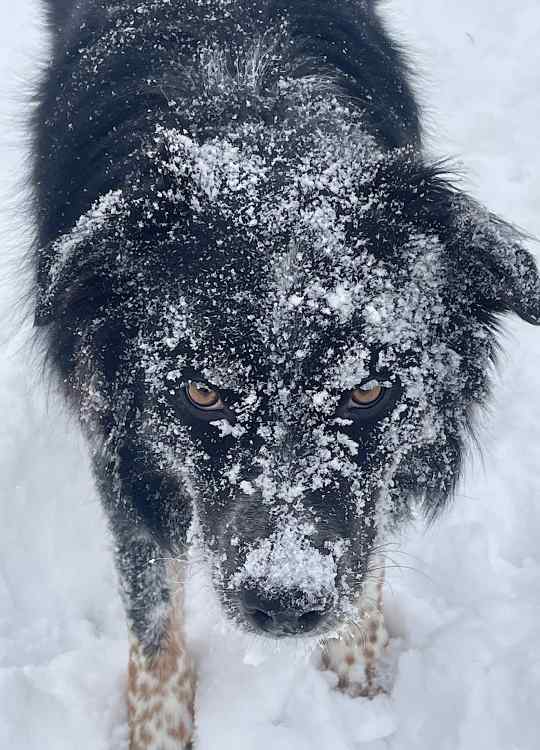
Here is Bruno, my 4 year old Australian Shepherd. And then here is bolt, my 6 year old border collie/lab mix. I’m not sure if you can tell, but they are very different dogs.

-
If you are saying you have an Xplore on the boat and in the kayak, you have two options to transfer your waypoints: Export the waypoints to an SD card and import them on the kayak fish finder. Select the waypoints on your boats fish finder and import them to the one boat network app on your phone. You can then import these waypoints from the one boat network app to you kayak fish finder Option 1 is what I do for my Helix’s and it’s just a few button presses. P.S. I would 100% make sure all of your waypoints are backed up to SD cards if they are not already.
-
If you have cellular service, you could always drop a pin on your phone. You could review this later to get the coordinates and enter them into your graph. This might be an alternative if you don’t have a ton of way points to input and you are 100% sure you will have service.
-
What units are we talking about? On my humminbird helix units, if I insert an SD card, a message comes up and I have the option to load the waypoints. This keeps the data on the SD card and does not overwrite anything. For peace of mind, have another SD card where you backup your kayak WPs in advance. This way it’s pretty risk-free if you make a mistake.
-
Can you export your waypoints from the boat graph to an SD card then load them to your kayak unit? There are options to export all or export individual waypoints. This is pretty simple as long as you are using the same brand equipment (Humminbird , Garmin, etc.) If going on a friends boat, go to the waypoint management screen and sort by newest-oldest then look for the date stamp. That should help you pinpoint exactly the WPs to export to your kayak. Be careful not to overwrite your old kayak waypoints with your new data.
-
This is awesome. I wouldn’t even know where to begin.
-
Thanks so much— awesome video! I plan to do what you did on the windshield but I have USB A’s next to the drivers seat so I will need maybe a 5 foot cable. And I need to figure out what the output is to make sure the usb can even power my 13. That juice bank seems like it is mounted pretty solid. I was previously looking at the pole that is powered by the running light. I really like the unpowered stick in the center seat pedestal position coupled with the juice bank that shows a centered video. I’m going to see if I can make that work with my old GoPro camera. If not, maybe that’s justification to get the 14 when it comes out 😃. thanks again. Much appreciated.
-
Awesome-that battery pack looks like it would do everything I need and it’s pretty cheap too. Do you by chance use the jaw clamp grip on the windshield? The yolotek website states to not keep it mounted when running the boat. I wonder how unstable the combo would be. I always take the jaw grip off the windshield in rough water. Sounds like a good strategy for the Mexico trip. Kind of stinks that you even have to do that, but like you said, hopefully they fix that with a new processor that can operate at much higher temperatures. Definitely looking forward to that Mexico video and hopefully no GoPro issues!
-
Pepper spray/OC can be effective but it does not work on everyone. And many people are able to fight through it, but it may be enough to get away from that person. I would start there if you cannot diffuse a situation. If you are going to pull a pistol on someone, you better be fully justified and ready to use it. You can’t think maybe it will scare someone, or maybe it will just wound them. It is meant as deadly force ONLY.
-
I use looping mode. I’m pretty good (but not perfect) at ensuring I start/stop the video for each desired clip. More often than not, it’s the dead GoPro battery that keeps me from recording a key video. This year I will play around with the hindsight setting, since I can’t use traditional looping with the ultra wide lens. As long as I remember to hit the record button during an event, the worst that can happen is I forget to end the video and it records the entire trip.
-
I hear you on the video quality. I didn’t buy a hero 13 just to continue using 1080. Even though the overheating you describe is relatively infrequent, that is frequent enough to risk losing the highlight video of a trip. I know this would be a pain, but do you think using batteries and replacing when the GoPro shuts down is enough time for the unit to cool off? I have only used the hero 13 indoors and the longest I recorded was for 30 minutes. It did get suprisely hot, something I’ve never experienced with the hero 3. Looping mode is definitely a trade off. I like that it only records what I want it to, but at the same time I have forgot to start/stop recording. I’d like to think now that I have voice controls, that will help but only time will tell for me. There’s also something called hindsight (not sure if that’s a new feature) that can be used, but it really is not a solution. It records for a set interval before you hit the record button and then continues until you hit the stop button. I’m going to try that but I can see me yelling to my GoPro in high winds and it not recording. I guess I’ll test run this year and see if I encounter any issues and adjust from there. Thanks for the input and hopefully I don’t have to trade this in for a newer model!
-
@A-JayHow often do your GoPros shut down in the summer months from overheating? Do you always film in 4k? I might need to come up with a backup plan for hot summer days with little to no wind.
-
I just checked the specs to see for myself and I’m a little confused on this. I have the GoPro Hero 13 black ultra wide edition. I was under the impression it’s the same camera and specs just with/without the ultra wide lens? The difference between 95 and 104 might not be a huge deal in PA, but the would be crucial the further south you live.
-
I have not experienced this either, but I have been using a GoPro hero 3 silver. I always keep it in the waterproof case which you figure would retain heat. I will say that the hero 13 that I just picked up heats up quick when filming even for 20 minutes, so it could be related to better video quality.
-
Looping mode is your friend and would significantly reduce the need to review large amounts of footage.
-
@bowhunter63 are you using a full size or mini for river smallmouth?
-
Good idea. It works on a jig but never thought about it for a bladed jig. I’ll give it a shot
-
I have that on my short list of trailers to try. My only issue is that it is elaztech. I want to store my chatterbaits together and the elaztech kills plastics.