


.JPG.b2da17f7bceb0a167ebf0c0b7ca9824d.JPG)
RSmall
Members
-
Joined
-
Last visited
Everything posted by RSmall
-
Hello and welcome to BR!
-
Hello and welcome to BR!
-
Hello and welcome to BR!
-
Hello and welcome to BR!
-
Hello and welcome to BR!
-
Hello and welcome to BR! Richmond here. Your favorite river being the Shenandoah makes me think you're somewhere near Front Royal?
-
Hello and welcome to BR!
-
There's a Garmin troubleshooting video floating around somewhere. I am assuming you've tried at least some of these steps. They say to stop and check if depth readings are working after each step. In order, their suggested steps are: 1. Make sure transducer is transmitting (yeah, you laugh but I accidentally turned mine off once) 2. Try a factory reset. 3. Manually set depth range. 4. Adjust frequency - 200 mhz works better in shallow water than 77. 5. Adjust gain - higher sensitivity for soft bottoms eg. mud, lower for hard bottoms eg. rocky. If none of these work, call Garmin support at: 800-800-1020
-
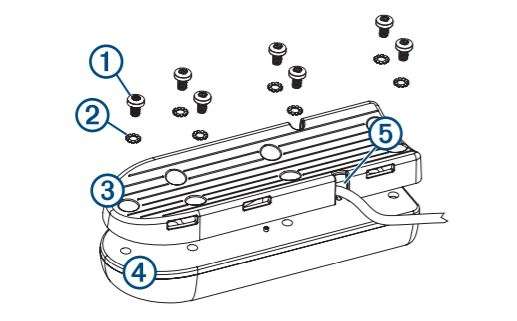
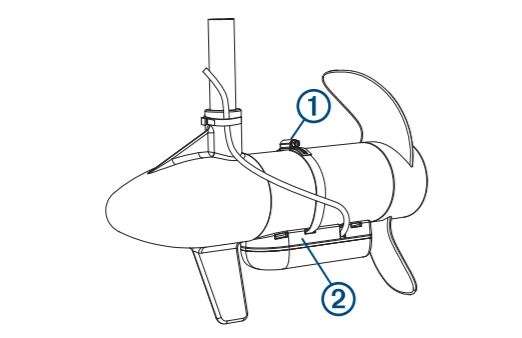
Not sure that this has anything do do with the issue, but, it appears that the transducer in the photo is attached to the trolling motor using the transom mount hardware. The photos are snips from the Garmin installation instructions. The reading of 12.1 volts which suggests power is fine as long as it's connected to a battery that's about 50 percent discharged. If it's connected to a fully charged battery, then there may be an electrical issue. I have two Striker 4 Plus CVs mounted on our pontoon boat including one on a trolling motor at the bow. I have had issues with depth readings twice - the first time, something had chewed on the cable but the screen showed a message that no transducer was connected. a no transducer connected message. On the other occasion, the transducer just got a little fouled up and the depth reading worked just fine after cleaning it off.
-
Hadn't heard of a cutter worm so I wandered over to the SK site and saw that they're new. Please let us know how those work out.
-
Richmond here as well. Welcome to BR!
-
Hello and welcome to BR!
-
Hello and welcome to BR!
-
Hello and welcome to BR!
-
I grew up in Kingston and I too am 50. Went to LaSalle Secondary. You? By the way, welcome to BR!
-
Hello and welcome to BR!
-
Hello and welcome to BR!
-
Hello and welcome back to BR!
-
Hello and welcome to BR!
-
Hello and welcome to BR!
-
Hello and welcome to BR!
-
Hello and welcome to BR!
-
Hello and welcome to BR!
-
Hello and welcome to BR!
-
Hello and welcome to BR!
.thumb.JPG.abd18529761238e073e7db229f67751d.JPG)
